01
No Xcode, on purpose
The whole app builds with swift build and a shell script that assembles and ad-hoc signs the .app bundle — which meant learning exactly what Xcode does for you, then doing it by hand.
Case study · 2026 · Personal daily driver
A macOS notch companion in Swift/SwiftUI — Now Playing, a file shelf, a mirror, and a system HUD living around the MacBook notch. Built without Xcode.
Role
Solo developer
Type
macOS app · Swift & SwiftUI
Year
2026
Links
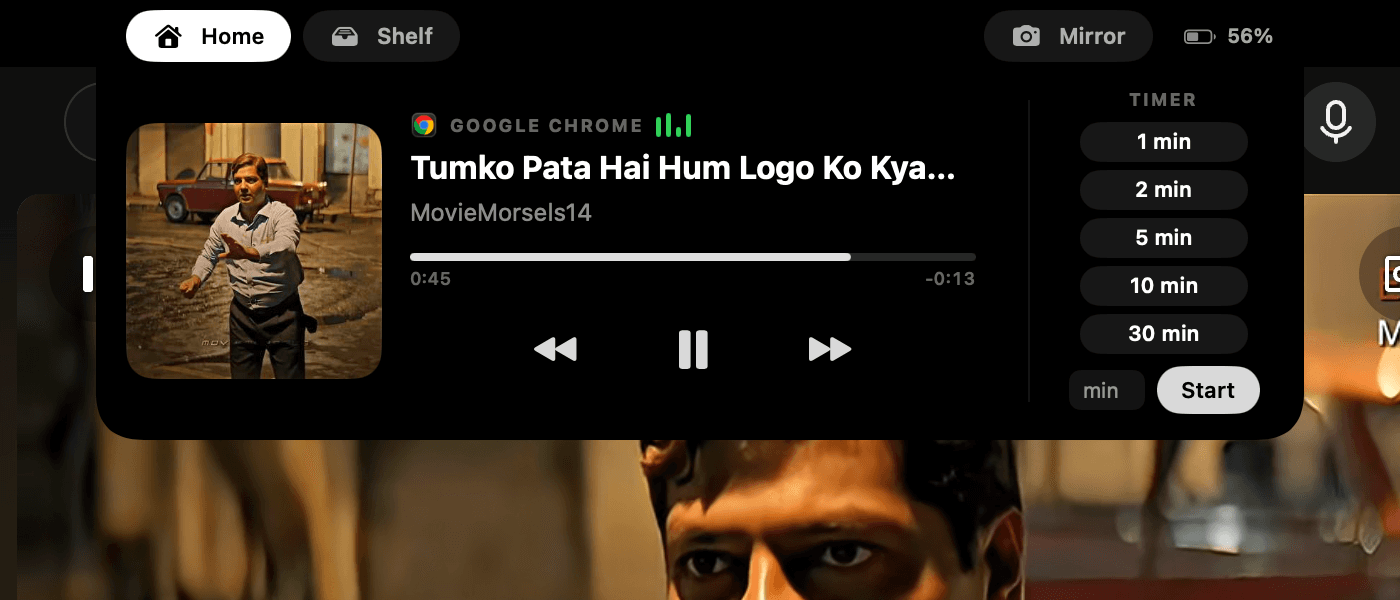
Expanded notch shelf — Now Playing, files, and quick tools
Overview
The MacBook notch is dead space with prime real estate. NotchPal turns it into a control surface: hover and it blooms into a panel with Now Playing controls, a drag-and-drop file shelf, a camera mirror, timers with a countdown ring traced around the notch itself — plus a battery readout in the corner.
It's also a systems project: no Xcode (Swift Package Manager and command-line tools only), private-framework spelunking for media metadata, and an NSPanel that has to live where AppKit insists windows can't.
0
Xcode involved
3
Tabs — Home, Shelf, Mirror
26px
HUD that grows below the notch
100%
Swift + SwiftUI
Apps like NotchNook proved the notch can be useful — but I wanted mine: my animations, my features, my rules, and a codebase I understand down to the window server.
The hard parts are all systems problems. macOS 15.4+ returns empty Now Playing data to third-party binaries; AppKit actively pushes windows out of the menu-bar zone; and the volume HUD needed to appear without any of the permissions a global event tap requires.
A borderless panel over the notch, and everything that lives inside it:
Artwork, controls, progress — via a MediaRemote helper, with AppleScript fallback for Music/Spotify
A drag-and-drop file tray that follows you between apps, and a camera mirror tab
Volume and brightness changes stretch the notch downward with an animated level bar
A countdown ring traced around the notch silhouette, presets, and a battery badge in the corner
macOS 15.4+ answers MediaRemote queries only for Apple-signed processes — so a helper runs via /usr/bin/swift (an Apple-signed interpreter), streams now-playing JSON over stdout, and takes play/pause commands on stdin.
The panel overrides constrainFrameRect to defeat AppKit's menu-bar eviction, and sets its level above the main menu — ordered carefully, because isFloatingPanel silently resets window level.
A CoreAudio property listener on the default output device catches every volume/mute change — no event tap, no Accessibility prompt — and brightness polls a private DisplayServices getter that fails silently if Apple removes it.
Open: window grows silently, then the shape springs into it, then content fades in. Close: exact reverse. Resizing and animating in the same pass makes SwiftUI pop instead of spring — sequencing is the feature.
The whole app builds with swift build and a shell script that assembles and ad-hoc signs the .app bundle — which meant learning exactly what Xcode does for you, then doing it by hand.
The collapsed pill grows wings for media, stretches down for the HUD, and blooms into a panel — each needs the NSWindow resized at the right moment relative to the SwiftUI animation, or the whole illusion collapses.
MediaRemote and DisplayServices are private frameworks that can vanish any release. Every private call sits behind a fallback (AppleScript polling, feature disabling) so the app degrades instead of crashing.
NotchPal runs on my Mac every day — music control, file shelf, volume HUD, and timers all living in the notch, with the exact feel I wanted because every spring constant is mine.
It's the project that took me from web developer to systems developer: window servers, CoreAudio listeners, process signing, and the discipline of building against APIs that owe you nothing.
What's next